How to search resume directly on google.com
Want to learn how to find resumes on the Internet using Google? You’ve come to the right place!
Whether you are new to searching the Internet for resumes or you are a veteran Interent sourcer, I’ve included some tips, tricks, and observations for the novice and expert alike.
Targeting Resumes
When using Google to search specifically for resumes, it’s a good idea to begin by searching for the word “resume” in the title and/or the url of web pages.
For example: (intitle:resume OR inurl:resume)
Here is a sample result to illustrate how this works – we can see the word “Resume” in the blue TITLE line, as well as in the green URL line. The first line of any search result is the title of the webpage, and the url is the specific web page’s address.
Targeting the word “resume” in the title and/or url is very handy, because for many people, it’s simply common sense/instinct to either title the web page containing their resume with the word “resume,” and/or save their resume using the word “resume” in the name of the file.
Eliminating False Positive Results
A “false positive” result is a search result that contains your search terms, but does not match the “essence” of what you are actually trying to find. For example – if you’re searching for resumes, there are many sites that will be returned in your search results that are in fact not resumes, such as sites advertising resume samples and job postings that mention phrases such as, “submit resumes to…”
In order to remove most non-resume false positive results, you can use Google’s version of the Boolean NOT operator, which is the minus sign, to prevent your search from returning results with words such as sample, job, etc.
For example:
(intitle:resume OR inurl:resume) -job -jobs -sample -samples
Other ideas of terms you can try to eliminate that may return false positive results:
-eoe -submit -free -”resume service” -template -”resume service” -”resume writers” -”resume writing”
Targeting Local Resumes
Area Codes
Some people who decide to make their resume available on the Internet also decide to publish a phone number. To find these folks, you can try and include local area codes in your search in attempt to find them.
Here is an example of a search using area codes to target people who live in Northern VA:
(intitle:resume OR inurl:resume) -job -jobs -sample -samples -”resume service” (703 OR 571)
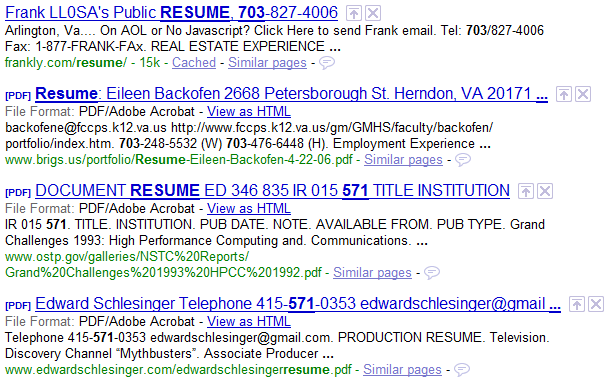
What you’ll notice, however, is that searching for area codes can easily produce false positive results, as can be seen in the screenshot below – which are the first 4 results from the search. Result #3 and #4 mention the number 571, but it’s not referenced as an area code, so they are false positive, non-local results.
To clean up the false positive results that mention 571 or 703 but are not of resumes of people who live in VA, you can add the state and state abbreviation to the search as well as exclude more non-resume terms and phrases:
While there are still a good number of non-resume false positive results, this can be expected because we didn’t even search for any keywords/skills. Once we do, we will notice a significant drop off in false positives.
For example:
http://www.booleanblackbelt.com/2009/02/challenging-google-resume-search-assumptions/
More examples:
Example: (intitle:resume OR inurl:resume OR intitle:cv OR inurl:cv OR intitle:”curriculum vitae” OR inurl:”curriculum vitae”) -job -jobs -sample -samples -submit -free -”resume service” -template -”resume service” -”resume writers” -”resume writing” account pune 411
Always beginning your resume searches using the (intitle:resume OR inurl:resume OR intitle:cv OR inurl:cv OR intitle:”curriculum vitae” OR inurl:”curriculum vitae”)
Or syntax like this, specifically targeting urls and titles that contain the word “resume”:
Java (intitle:resume OR inurl:resume OR intitle:cv OR inurl:cv OR intitle:”curriculum vitae” OR inurl:”curriculum vitae”) -job -jobs -sample -samples -”resume service” 75001..76155 (TX OR Texas)
OR
Always beginning your resume searches using the (intitle:resume OR inurl:resume) syntax like this, specifically targeting urls and titles that contain the word “resume”: Java (intitle:resume OR inurl:resume) -job -jobs -sample -samples -”resume service” 75001..76155 (TX OR Texas)
In the first post I left some unanswered questions, such as why:
- I didn’t talk about searching for CV’s
- I didn’t suggest using the tilde ~ operator in conjuntion with the word “resume”
- I didn’t use -~job when trying to eliminate false positive results
- I didn’t talk about targeting filetypes
- I didn’t talk about just searching for the word “resume” without using it in conjunction with inurl: or intitle:
- I didn’t mention the use of Google Custom Search Engines (CSE’s) to find resumes
Whether or not you had those questions burning in your mind, I will address them all in this post.
Challenging Google Resume Search Assumptions
I’ve read my fair share of recruiting blogs and online discussions between recruiters and sourcers. As such, I encounter quite a bit of advice regarding tips and tricks to use when searching for resumes on the Internet using Google.
Some of the suggestions I see make sense at first, but being the inquisitive guy that I am, I don’t just take the suggestions and run with them, assuming they accomplish what they seem to accomplish. I take the time to test search tips, tricks, and suggestions to make sure they add value to my search efforts and that they do EXACTLY what they claim to do.
Today, you get to benefit from some of these tests, as I am going to challenge some of the suggestions I’ve come across over the years when it comes to searching for resumes on the Internet using Google. Let’s get going, shall we?
Using ~Job To Eliminate The Words Job And Jobs From Results
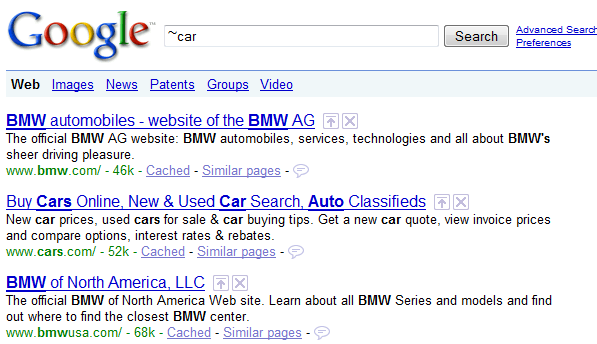
Google has a special operator that allows you to search for synonyms, as well as alternate endings for any word that is preceded by the tilde ~ symbol. For example, let’s see what kinds of results are returned by this simple search: ~car
You can see that Google returned results including the word “car,” but also highlighting words such as “BMW,” and ”cars” - words Google’s search engine thinks are synonymous with the word “car.” The fact that Google thinks the word “car” is synonymous with BMW is powerful and free advertizing for BMW – but that’s for another post.

I’ve seen some sourcers and recruiters suggest coupling the tilde ~ symbol with the word “job” in an attempt to eliminate results with the words “job” and “jobs,” instead of using both -job and -jobs, as I recommend.
HOWEVER - I have found that using -~job does NOT in fact eliminate all results that mention word variants, or words with alternate endings, such as “jobs.” For example – run this on Google: (intitle:resume OR inurl:resume) -~job
On page 2 of the results, you can find this:
Yep – I see the word “jobs” in there, don’t you? —> “I’ve had too many jobs.”
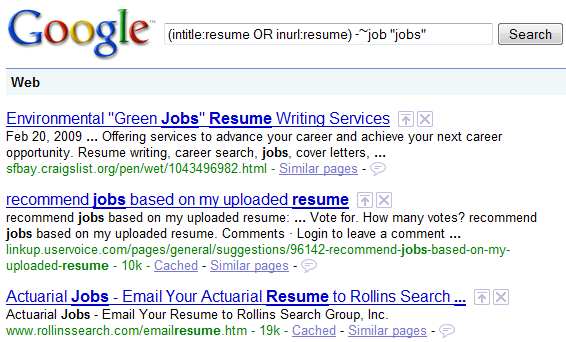
Let’s see what happens if we actually try to use -~job and also search specifically for the word “jobs” in the same search: (intitle:resume OR inurl:resume) -~job “jobs”
If Google actually interpreted -~job as both -job and -jobs, we shouldn’t get ANY results, let alone nearly half a million, because the search is written to actually look for a word we are trying to eliminate.
You will essentially get the same results if you run the search this way: (intitle:resume OR inurl:resume) -~job +jobs
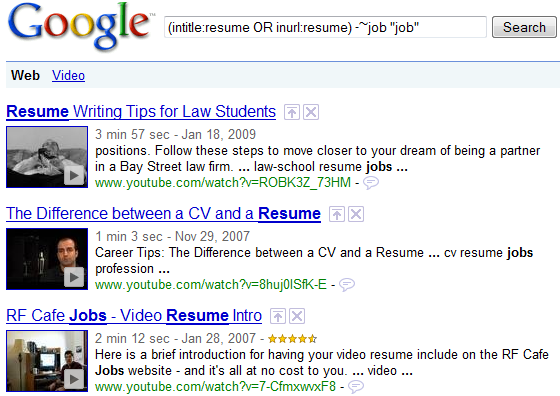
But wait, the Google search weirdness continues! Let’s see what happens when we use -~job and also try and make Google search for “job” at the same time: (intitle:resume OR inurl:resume) -~job “job”
I hope you can appreciate how strange those results actually are.
Confused by the results? Me too!
It actually takes using Google’s “exactly as is” search symbol, the plus + sign to finally see that at least using -~job will in fact eliminate the word “job” from search results.
What this testing demonstrates is that trying to eliminate the 2 words “job” and “jobs” from being returned in search results by using -~jobs DOES NOT WORK.
It appears that the tilde operator on Google does not in fact also search for and return (or eliminate) words with alternate endings, such as plural words. For the word “car,” yes, but not when it comes to the word job. As such, it’s safer to simply write out -job -jobs.
Using ~Resume To Search for Resumes and CV’s
I’ve heard some people suggest coupling the tilde with the word resume, in order to find results that have words synonymous with the word “resume,” such as CV or Curriculum Vitae in their url or the title of web results.
For example: Java (intitle:~resume OR inurl:~resume) -job -jobs -sample -samples -”resume service” 75001..76155 (TX OR Texas)
Let’s test this theory.
Search #1 No Tilde
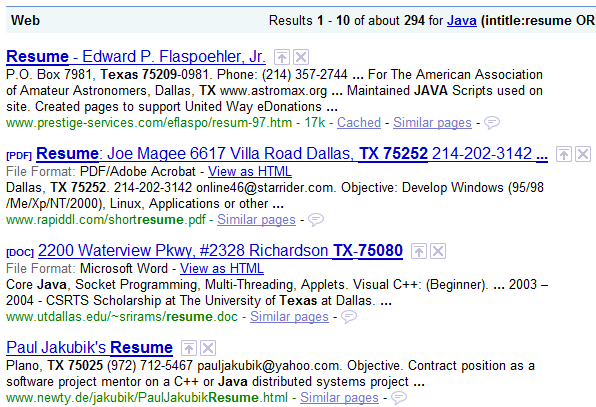
Java (intitle:resume OR inurl:resume) -job -jobs -sample -samples -”resume service” 75001..76155 (TX OR Texas)
Search #2 WITH Tilde
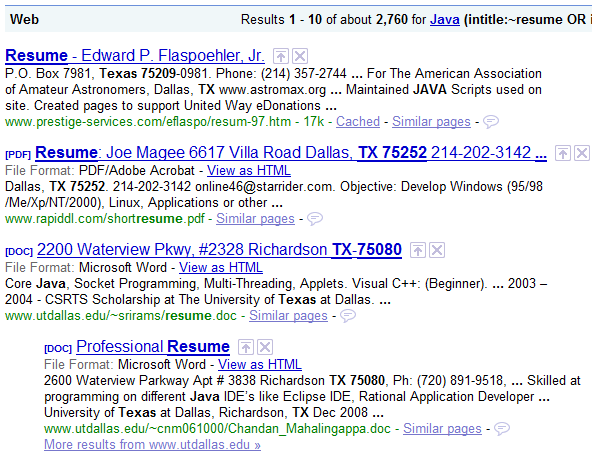
Java (intitle:~resume OR inurl:~resume) -job -jobs -sample -samples -”resume service” 75001..76155 (TX OR Texas)
Wow! 2760 results when we used the tilde vs 294 without the tilde – seems like a no-brainer to always throw in the tilde when searching for resumes, right?
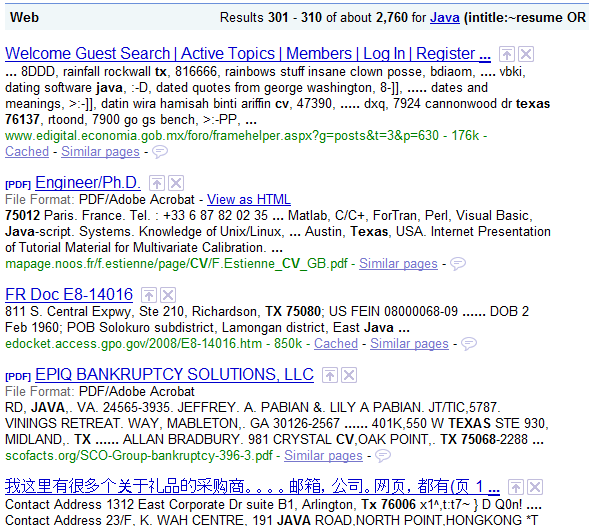
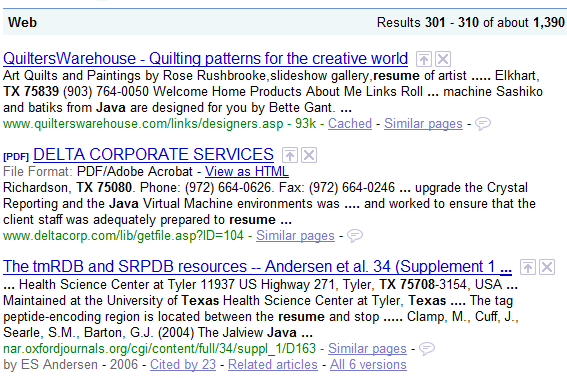
Not so fast…let’s take a look at the search results past result #300 when using the tilde and see what we find:
Some pretty ugly results, right?
Yuck!
So where are the 2400 extra resumes we were expecting to get?
Keep searching past the 300 mark and you will see tons of junk results. That’s why I can’t in good conscience recommend using the tidle ~ in conjunction with the word “resume” when searching for resumes.
Where are the CV’s Anyway?
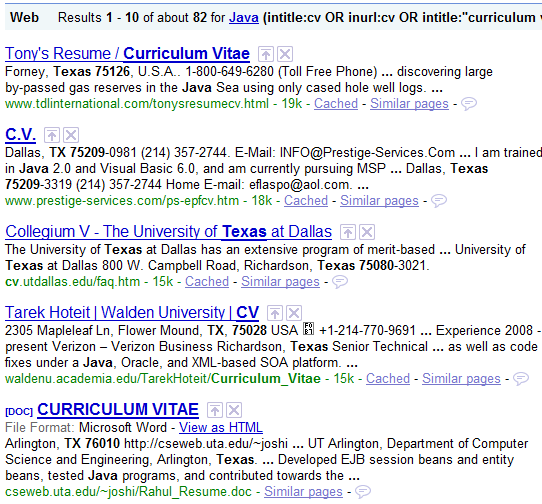
If you’re wondering where the CV’s were in the results, you can simply target them with a search string like this: Java (intitle:cv OR inurl:cv OR intitle:”curriculum vitae” OR inurl:”curriculum vitae”) -job -jobs -sample -samples -”resume service” 75001..76155 (TX OR Texas)
More on Searching for CV’s
You could of course search for both “resume” and CV in the titles and urls in web pages and documents, like this: (intitle:resume OR inurl:resume OR intitle:cv OR inurl:cv OR intitle:”curriculum vitae” OR inurl:”curriculum vitae”)
But when I have searched for CV’s, I have noticed that many people who save their resumes online who use the term CV are in school, are educators at a university, or are international (non-US) folks, whom you may or may not be able to engage depeding on your location and need.
Did you notice that 4 out of the 5 results from the last screenshot have .edu in the url? That means they are from university sites, and I have found many of these .edu CV’s to be of people with no paid work experience – which depending on your hiring needs, you may not be able to hire.
Auto-Stemming: Trying to Use -Job to Eliminate “Jobs” From Results
When it comes to your search terms, Google claims that they will look for some word variants automatically, such as words with alternate endings or pluralization.
However, it does not appear to work on the word “job.”
For example, if you are trying to eliminate false positive results of the word “jobs” when searching for resumes, using -job does not eliminate results with the word “jobs,” although if Google were in fact truly auto-stemming the word job, we could assume it should.
For example, let’s try this: (intitle:resume OR inurl:resume) -job
That result does in fact mention the word “jobs.”
So once again I have to recommend simply spelling out -job -jobs when trying to eliminate job-related false positive results, because Google does not auto-stem -job to also include -jobs.
Not Searching for the Word “Resume” in Titles and URLs
I’ve heard some sourcers and recruiters say that it is unecessary to search for the word “resume” specifically in titles and URLs, through the use of (inurl:resume OR intitle:resume).
This is because simply searching for the word “resume” should return results with the word “resume” in the body of the website/page as well as in the url and title.
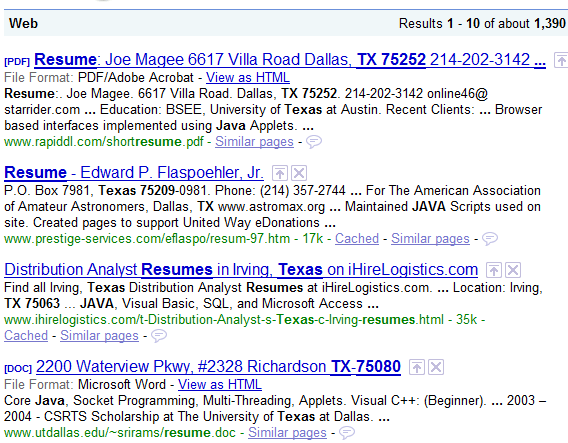
This is accurate, for example - let’s see what happens if we run this search: Java “resume” -job -jobs -sample -samples -”resume service” 75001..76155 (TX OR Texas)
You can see that the word “resume” is in fact highlighted in the blue title and green url lines, as well as in the “body” of the search results.
If you remember, the search I used previously that did specifically target (inurl:resume OR intitle:resume) only returned 294 results.
When I searched for “resume” without specifying that the word had to be in either the url or title, I got 1390 results.
That’s a big difference!
However, let’s not get too excited about the “extra” 1100 results we get from just searching for the word “resume” and not limiting the search to only results mentioning “resume” in the url and/or title.
Umm…those aren’t resumes – those are false positives!
Quality vs Quantity
Don’t ever be impressed by large quantities of results until you check in the “deep” end and make sure that they are just as high quality as the first few pages.
This test has shown that simply searching for the word “resume” anywhere and not forcing Google to specifically target results that mention the word “resume” in the title and/or url of results does not in fact yield more high quality results.
What it does is get you more junk in most cases.
So I recommend always beginning your resume searches using the (intitle:resume OR inurl:resume) syntax like this, specifically targeting urls and titles that contain the word “resume”: Java (intitle:resume OR inurl:resume) -job -jobs -sample -samples -”resume service” 75001..76155 (TX OR Texas)
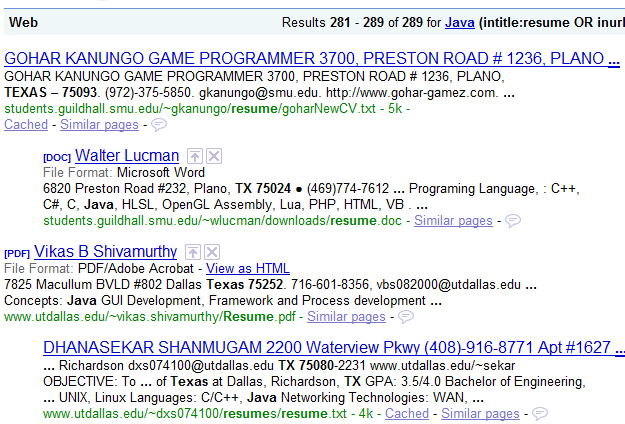
Here is a snippet from the the LAST page of the results:
Yep – resumes all the way to the last page.
Searching for Filetypes
The last assumption I will challenge is that it’s always a good idea to search for specific file types when searching for resumes on the Internet.
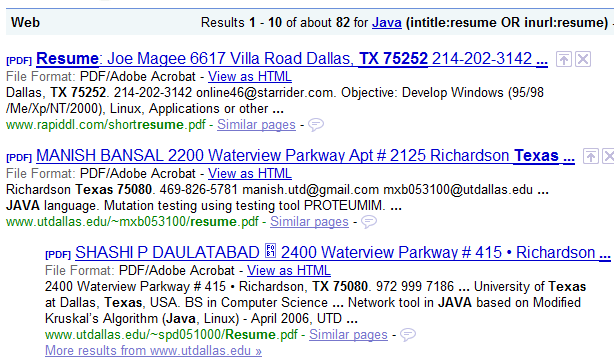
Google does support searching for results of specific filetypes – here is an example of a search targeting PDF files:
Java (intitle:resume OR inurl:resume) -job -jobs -sample -samples -”resume service” 75001..76155 (TX OR Texas) filetype:pdf
All of the results are PDF files.
While searching for specific filetypes can be handy, there are many filetypes available to people when saving their resume online.
Back in 2007, I read
Jim Stroud’s Resume Sourcing Survey and it was an eye-opener – there are so many different filetypes people use when creating and saving resumes online. While you may think you are uncovering a lot of resumes when searching for doc, html, php and pdf fileytpes, you’re probably not searching for ASP, XML, PID, PHTML, MHT, DOT, CGI, XSL, WPD, and SDW filetypes.
I am not exactly sure why some people suggest searching for specific filetypes when searching for resumes. If I had to guess, I would say it has something to do with trying to get rid of false positive non-resume results.
Perhaps the thought process is that job postings and such are not typically DOC or PDF files?
In any event, searching for specific filetypes is unnecessary, because when you use a search string that doesn’t specify filestypes such as this one: Java (intitle:~resume OR inurl:~resume) -job -jobs -sample -samples -”resume service” 75001..76155 (TX OR Texas) …you’ll get every resume result available, REGARDLESS OF FILETYPE.
You can see from the results below that it returns ALL results, regardless of filetype. In the screenshot, you can see we snagged 4 different filetypes from the first 4 results: HTM, PDF, DOC, and HTML.
That’s why I don’t recommend targeting specific filetypes – because if you do, unless you actually search for every possible filetype available, you will be missing results.
Perhaps the only time I would strongly recommend targeting specific filetypes is when you are specifically looking to find people who do not title or save their resume with the word “resume.”
Using Google Custom Search Engines (CSE’s) to Find Resumes
Creating your own and using others’
Google CSE’s can be a convenient way of automatically building in core and essential search logic (title/url search, false positive term removal, etc.) so that you don’t have to keep entering it into your searches.
However, when it comes to using someone else’s CSE, I’d advise that you not blindly use it without adapting it to your specific use.
Only you know what it is you are looking for specifically, where you would like to get your results from, and the specific locations you would like to recruit from.
I believe the best CSE’s are those that have location-specific logic built in, so that all you need to enter is your keywords and nothing else.
Implicitly trusting that someone else’s custom search engine has the optimum search logic would be a mistake. Use CSE’s designed by others as a starting point to modify and create your own that suits your specific need.
Conclusion
I hope you enjoyed me walking you through testing some of the more common Google resume search suggestions I’ve come across over the years.
It can be both easy and dangerous to follow search advice from anyone, regardless of their experience or reputation, and take their suggestions and immediately begin putting them to use.
I strongly recommend that you take the time to thoroughly test any sourcing/recruiting advice you read or hear about before making the assumption that it works as intended and that can help you achieve your goals.
As I’ve shown you today – some suggestions such as searching for specific filetypes can actually prevent you from finding all of the resumes available online, and others such as searching for ~resume can yield more junk than viable results.
---------------------
Read more in following Internet Link: